Thursday, September 14, 2017

importing relational database table to hbase table - Sqoop

Importing relational database table to hbase table - Sqoop is the best tool for it.

Its a two step process

1. create hbase table

2. import the data from relational table to hbase table using sqoop import

  • hbase  - create table in hbase  

[mapr@hostname lib]$ hbase shell

hbase(main):002:0> create 'DV_PRODUCTION_BRANCHES', 'DETAILS'

  • Sqoop - copy oracle driver and load the data into hbase table using below command.

1. copy oracle driver to lib - /opt/mapr/sqoop/sqoop-1.4.6/lib/

2. run sqoop import
sqoop import --connect jdbc:oracle:thin:@LOCALHOST:1521/DVTST --username DV_PRD --password dv_tst \
--table DV_PRODUCTION_BRANCHES  \
--columns "PRODUCTION_BRANCH_ID,NAME" \
--hbase-table 'DV_PRODUCTION_BRANCHES' \
--column-family DETAILS \
--hbase-row-key PRODUCTION_BRANCH_ID \
-m 1

Points to be noted - 
  • DV_PRODUCTION_BRANCHES is the relational table in DVTST database 
  • DV_PRODUCTION_BRANCHES is name of the hbase table with column family DETAILS and rowkey as PRODUCTION_BRANCH_ID 
  • Sqoop doesn’t permit multiple column families at the time of when this blog was written. You need to create HBase table first with multiple column family and then execute three Sqoop import operations to import each column family. 

Saturday, September 2, 2017

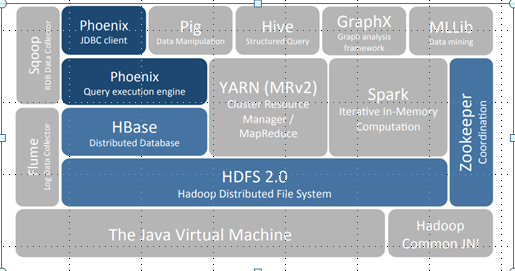
Apache Phoenix


What:
  • Apache Phoenix is sql skin over No Sql database (HBase).  
  • Its Enables OLTP and operational analytics on Hbase.
  • Apache Phoenix is fully integrated with other Hadoop products such as Spark, Hive, Pig,Flume, and Map Reduce.

Who/When:
  • The project was created by the Salesforce.  
  • It was originally open-sourced on GitHub and became a top-level Apache project on 22 May 2014. 


Challenge :
  • The challenge today is blending the scale and performance of NoSQL with the ease of use of SQL


  Hbase
  • Hbase NoSQL column family database
  • Store data as sorted maps as byte Array
  • Low level APIs
  • Write Java code or use low level API

Why Phoenix

  • Relational database engine supporting OLTP for Hadoop use Apache Hbase as its backing store.
  • Transforms SQL queries to Hbase calls hence hiding complexities for noSQL functions.
  • Low Latency  
  • Reduces the amount of code users need to write 
  • Performance optimizations transparent to the user(scans, server-side filter, secondary indexes )

Phoenix and Hbase together


Accessing HBase data with Phoenix can be easier than direct HBase API

SELECT column FROM table WHERE column > 30

Versus


scan 'table', {FILTER => "ValueFilter(=,'binary:30')",LIMIT => 10}

Versus

HTable t = new HTable(“table”);
RegionScanner s = t.getScanner(new Scan(…, new ValueFilter(CompareOp.GT, new CustomTypedComparator(30)),…));
 while ((Result r = s.next()) != null)
{
// Reading values from Result class object
byte [] value = result.getValue(Bytes.toBytes(“columnfamily"),Bytes.toBytes(" column "));
System.out.println(Bytes.toString(value));
}
s.close();


Architecture


Phoenix pushes processing to the server - most "by hand” API accesses do not use co-processors  
Phoenix supports and uses secondary indexes
Phoenix uses "every trick in the book" based on various factors: the HBase version, metadata and query, reverse scans, small scans, skip scans, etc. 


Few Phoenix SQLs:

Create table  -

CREATE TABLE IF NOT EXISTS us_zip (
      zip CHAR(5) NOT NULL,  
      city VARCHAR NOT NULL,
      hhc BIGINT
      CONSTRAINT my_pk PRIMARY KEY (zip,city))
DATA_BLOCK_ENCODING='NONE',VERSIONS=5,MAX_FILESIZE=2000000 split on (‘a’, ‘p’ ,’r)’
COMPRESSION=‘LZ4’ TRANSCATIONAL=true;

Insert few records -

UPSERT INTO us_zip  VALUES('60500','New York', 81431);
UPSERT INTO us_zip  VALUES('60501',‘Dallas', 91233);
UPSERT INTO us_zip  VALUES(‘06095,‘Windsor, 92433);

Query -
SELECT zip,city ,hhc
FROM us_zip
where hhc = (select max(hhc) from us_zip );

View on the top of Hbase table - 

CREATE VIEW “test_log“  ( k VARCHAR primary key, “name”."value" VARCHAR);

CREATE VIEW my_view ( new_col SMALLINT )
    AS SELECT * FROM my_table WHERE k = 100;


Phoenix benefits
SQL Datatypes built in
•Schemas, DDL, Hbase Properties
Composite Primary Key
•Map existing Hbase tables
•Write to Hbase, read from Phoenix
•Salting
•Indexes
•Client side rewriting
•Master-slave configuration
•Parallel scanning with final client side merge sort
•RPC batching
•Use secondary indexes if available
•Rewrites for multitenant tables

•Server side push down
•Filters
•Skip scans
•Parallel Aggregation
•TopN (coprocessor)

•Join and Subqueries
•Inner, left, right, Full Outer join, Cross Join, Semi Join, Anti Join

•Query server – Similar to REST Server
•Protobuf 3.0 over http
•Has JDBC thin client

Spark Integration

•Secondary index
•At query time, the optimizer will use the index if it contains all columns referenced in the query and produces the most efficient execution plan

Global index
•CREATE INDEX my_idx ON sales.opportunity(last_updated_date DESC)
•Read optimized(Use case)
•Different table per index
•Transactional tables indexes have ACID guarantee
Local Index
•CREATE LOCAL INDEX my_index ON my_table (v1)
•Write optimized (Use case)
•Use same table – different CF
Functional index
•Supported

By default, unless hinted, an index will not be used for a query that references a column that isn’t part of the index. 


  Future Road map
•Calcite Support
•No Generic Yarn or Tez layer
•Offset support
•Local index re-implementation

Sunday, August 20, 2017

Mapr 5.2

Async HBase (1.7.0)
 Metrics (5.2.1)
 Drill (1.10)
 Oozie (4.3.0)
 Drill-YARN (1.10)
 Pig (0.16)
 Flume (1.7.0)
 Sentry (1.7.0)
 HBase/MapR-DB Common (1.1)
 Spark (2.1.0)
 HBase (1.1)
 Spark Standalone (2.1.0)
 Hive (2.1)
 Sqoop (1.4.6)
 Hive Metastore (2.1)
 Sqoop2 (2.0.0)
 HTTPFS (1.0)
 Storm (0.10.0)
 Hue (3.12.0)
 Streams Tools (2.0.1)
 Hue Livy (3.12.0)
 Streams Clients (0.9.0)
 Impala (2.7.0)
 Tez (0.8)
 Mahout (0.12)
 YARN + MapReduce (5.2.1)
 Classic MapReduce (5.2.1) 

Wednesday, August 16, 2017

Kafka Object Serialization and DeSerialization

Serialization is the process of converting an object into a stream of bytes 

Deserialization is the process of converting stream of bytes  to an object.

Remember Kafka stores message as array of bytes 

To create a serializer class, we need to implement below interface 
org.apache.kafka.common.serialization.Serializer  


public interface Serializer extends Closeable {

//startup with configuration
  void configure(Map<String, ?> var1, boolean var2);
  byte[] serialize(String var1, T var2);
//method is called when the Kafka session is to be closed 
 void close();
}

To create a deserializer class, we need to implement below interface  org.apache.kafka.common.serialization.Deserializer 


public interface Deserializer extends Closeable {
//startup with configuration.
  void configure(Map<String, ?> var1, boolean var2);
  T deserialize(String var1, byte[] var2);
//method is called when the Kafka session is to be closed
  void close();

}


Its preety simple to implement so lets directly start with example - here I am creating 
1. UserMessage class, 
2. writing its serializer 
3. deserializer
4. using serializer in producer to convert object to byte stream and sending it to kafka
5. using deserializer in comsumer toget the object back from byte stream
 
-- UserMesasge.java-----
package com.valassis.serialization;

public class UserMessage {

 private String key;
   private String value;
   public UserMessage() {
   }
   public String getKey() {
  return key;
 }
 public void setKey(String key) {
  this.key = key;
 }
 public String getValue() {
  return value;
 }
 public void setValue(String value) {
  this.value = value;
 }
 public UserMessage(String key, String value) {
     this.key = key;
     this.value = value;
   }
   @Override public String toString() {
     return "UserMessage(" + key + "=>" + value + ")";
   }
}

---UserMessageSerializer.java
package com.valassis.serialization;

import java.util.Map;

import org.apache.kafka.common.serialization.Serializer;
import org.codehaus.jackson.map.ObjectMapper;

public class UserMessageSerializer implements Serializer<UserMessage> {

@Override
public void close() {
}

@Override
public void configure(Map<String, ?> configs, boolean isKey) {
// TODO Auto-generated method stub

}

@Override
public byte[] serialize(String topic, UserMessage data) {
byte[] retVal = null;
ObjectMapper objectMapper = new ObjectMapper();
try {
retVal = objectMapper.writeValueAsString(data).getBytes();
} catch (Exception e) {
e.printStackTrace();
}
return retVal;
}


}
---UserMessageDeserializer.java
package com.valassis.serialization;

import java.util.Map;

import org.apache.kafka.common.serialization.Deserializer;
import org.codehaus.jackson.map.ObjectMapper;

public class UserMessageDeserializer implements Deserializer<UserMessage> {

@Override
public void configure(Map<String, ?> configs, boolean isKey) {
// TODO Auto-generated method stub
}

@Override
public UserMessage deserialize(String topic, byte[] data) {
   ObjectMapper mapper = new ObjectMapper();
   UserMessage userMessage = null;
   try {
    userMessage = mapper.readValue(data, UserMessage.class);
   } catch (Exception e) {
     e.printStackTrace();
   }
   return userMessage;


}

@Override
public void close() {
// TODO Auto-generated method stub
}
}


----ZoneDataSerializerProducer.java 

package com.valassis.msg.producer;

import java.util.Map;
import java.util.Properties;

import org.apache.kafka.clients.producer.KafkaProducer;
import org.apache.kafka.clients.producer.Producer;
import org.apache.kafka.clients.producer.ProducerRecord;

import com.valassis.msg.generation.ZoneDataMessageCreationLocalFS;
import com.valassis.msg.generation.ZoneDataMessageCreationSerializerLocalFS;
import com.valassis.serialization.UserMessage;

public class ZoneDataSerializerProducer {
 public static void main(String[] args) {

  Properties props = new Properties();
  props.put("bootstrap.servers", "localhost:9092");

  props.put("key.serializer", "org.apache.kafka.common.serialization.StringSerializer");
  props.put("value.serializer",
    "com.valassis.serialization.UserMessageSerializer");
  props.put("request.required.acks", "1");
  props.put("client.id", "test");
  Producer<String, UserMessage> producer = new KafkaProducer<String, UserMessage>(
    props);
  ZoneDataMessageCreationSerializerLocalFS messages = new ZoneDataMessageCreationSerializerLocalFS();
  Map<String, UserMessage> messageMap = messages.getZoneData();
  System.out.println(messageMap.size());
  messageMap.forEach((key, value) -> {
     
   producer.send(new ProducerRecord<String, UserMessage>("testtopic", key , value));

  });
  producer.close();
 }

}

--- SparkStreamingDeserializerConsumer .java

package com.valassis.msg.consumer;

import java.io.IOException;
import java.util.Arrays;
import java.util.Collection;
import java.util.HashMap;
import java.util.Map;

import org.apache.hadoop.conf.Configuration;
import org.apache.hadoop.hbase.HBaseConfiguration;
import org.apache.hadoop.hbase.TableName;
import org.apache.hadoop.hbase.client.Connection;
import org.apache.hadoop.hbase.client.ConnectionFactory;
import org.apache.hadoop.hbase.client.Put;
import org.apache.hadoop.hbase.client.Table;
import org.apache.hadoop.hbase.util.Bytes;
import org.apache.kafka.clients.consumer.ConsumerRecord;
import org.apache.kafka.common.serialization.StringDeserializer;
import org.apache.spark.SparkConf;
import org.apache.spark.streaming.Duration;
import org.apache.spark.streaming.api.java.JavaInputDStream;
import org.apache.spark.streaming.api.java.JavaStreamingContext;
import org.apache.spark.streaming.kafka010.ConsumerStrategies;
import org.apache.spark.streaming.kafka010.KafkaUtils;
import org.apache.spark.streaming.kafka010.LocationStrategies;

import com.valassis.serialization.UserMessage;
import com.valassis.serialization.UserMessageDeserializer;

public class SparkStreamingDeserializerConsumer {

static Connection connection;

public static void main(String[] args) throws InterruptedException,
IOException {

SparkConf sparkConf = new SparkConf()
.setAppName("Pawan-JavaKafkaMessageConsumer");

Map<String, Object> kafkaParams = new HashMap<>();
kafkaParams.put("bootstrap.servers", "localhost:9092");
kafkaParams.put("key.deserializer", StringDeserializer.class);
kafkaParams.put("value.deserializer", UserMessageDeserializer.class);
kafkaParams.put("group.id", "1");
kafkaParams.put("auto.offset.reset", "latest");
kafkaParams.put("enable.auto.commit", false);

Collection<String> topics = Arrays.asList("testtopic");

// Create the context with 20 second interval batch size
JavaStreamingContext jssc = new JavaStreamingContext(sparkConf,
new Duration(20000));

Configuration conf = HBaseConfiguration.create();
/*
* /user/mapr/zonedatastream 17/07/31 16:36:41 ERROR AsyncProcess:
* Failed to get region location
* org.apache.hadoop.hbase.TableNotFoundException:
* /user/mapr/zonedatastream at org.apache.hadoop.hbase.client.
* ConnectionManager$HConnectionImplementation
* .locateRegionInMeta(ConnectionManager.java:1324)
*/
conf.set("hbase.zookeeper.quorum", "localhost:5181");
conf.set("hbase.master", "localhost:60000");
conf.set("hbase.zookeeper.property.clientPort", "5181");
conf.set("hbase.rootdir", "maprfs:///hbase");

conf.set("username", "mapr");
conf.set("password", "mapr");
System.out.println("getting connection");
connection = ConnectionFactory.createConnection(conf);
System.out.println("connection populated");
table = connection.getTable(TABLE_NAME);

JavaInputDStream<ConsumerRecord<String, UserMessage>> stream = KafkaUtils
.createDirectStream(jssc,
LocationStrategies.PreferConsistent(),
ConsumerStrategies.<String, UserMessage> Subscribe(topics,
kafkaParams));

// stream.mapToPair(record -> new Tuple2<>(record.key(),
// record.value())).foreachRDD(System.out::println);

// stream.mapToPair(record -> new Tuple2<>(record.key(),
// record.value())).print();
stream.map(record -> print(record.key(), record.value())).print();
;

jssc.start();
table.close();
// jssc.close();
jssc.awaitTermination();
connection.close();

}

// private static final TableName TABLE_NAME =
// TableName.valueOf("/user/mapr/zonedatastream");
// private static final TableName TABLE_NAME =
// TableName.valueOf("/user/mapr/zonedatastream");
// private static final byte[] CF = Bytes.toBytes("cf1");

private static final TableName TABLE_NAME = TableName.valueOf("test_log");
private static final byte[] CF = Bytes.toBytes("name");
private static Table table;

// Storing it to hbase
private static Object print(String key, UserMessage value) throws IOException,
InterruptedException {

// System.out.println("inside print");
// System.out.println("key ->" + key);
// System.out.println("value ->" + value);
// Table table = connection.getTable(TABLE_NAME);
// describe the data we want to write.
Put p = new Put(Bytes.toBytes(key));
p.addColumn(CF, Bytes.toBytes("messagekey"), Bytes.toBytes(value.getKey()));
p.addColumn(CF, Bytes.toBytes("value"), Bytes.toBytes(value.getValue()));
table.put(p);
return key;
}

}

Websphere Dummy certificate expired - DummyServerKeyFile.jks , DummyServerTrustFile.jks

If you faced issue with ibm provided dummy certificate expired just like us and looking for the solution.  This blog is for you.  You can re...