Friday, January 5, 2018

MemSQL - database for real-time analytics


MemSQL


MemSQL is relational, distributed, in memory SQL database platform for real-time analytics.


MemSQL is a proprietary closed-source distributed relational/sql database with both free community and paid enterprise edition

MemSQL enables sub-second refresh of dashboards with real-time data for improved accuracy of positions and risks to drive portfolio growth and customer satisfaction.


MemSQL is a two-tiered architecture consisting of aggregators and leafs.


Aggregators are cluster-aware query routers that act as a gateway into 

the distributed system.The only data they store is cluster metadata. 
The leaf nodes store and compute data .

Overview


  • Distributed SQL database, fully ACID, JSON and Geo Spatial support
  • Rely on main memory for storage.  It can spill to disk or pin data in-memory.
  • Need lot of memory - its a trade off but its cheaper today (every year 40% decrease). Cache is a new RAM, RAM is a disk and disk is
    the new tape. Leverage SSDs (no random write). NVRAM or non-volatile RAM
    is coming sometimes soon.
  • Use MySQL wire protocol.
  • seemless integration with Kafka
  • 10 million upserts per second

Architecture


  • memsqld,
  • aggregators
  • leaf(holds partitions) nodes

Aggregator node stores metadata and leaf node data in partitions 

A partition is an indivisible slice of data that can be replicated and

moved around the cluster.

Agg and Leaf workload


Communication and Ports


Sharding -
insert into tab01 values ('geocode','profileid, .....)
hash("geocode|profileid") % partition  = partition no. (say 8)

Code Example - Spark Aggregates RDBMS and Memsql data

Road Map

RoadMap

MemSQL not for 

  • MemSQL is not designed to be a persistence store (Hbase) or “data lake”
  • MemSQL supports extremely fast, distributed “READ-COMMITTED” transactions,                 but it is not suitable for applications which require “SERIALIZABLE” transactions.

Dependency
<dependency> 
<artifactId>memsql-connector_2.11</artifactId>
<version>2.0.2</version> 
</dependency>
/*using memsql connector with Apache spark. In a program,I tried to mix a streaming data coming to memsql and existing database table and join them and put the result for user dashboard. */


package com.valassis.msg.consumer;
import java.io.IOException; import java.util.Properties; import org.apache.spark.sql.Dataset; import org.apache.spark.sql.Row; import org.apache.spark.sql.SparkSession; public class MemsqlRDBMSConsumer { public static void main(String[] args) throws InterruptedException, IOException { SparkSession spark = SparkSession.builder() .appName("Java Spark MemSQL") .config("spark.memsql.host", "localhost") .config("spark.memsql.port", "3306") .config("spark.memsql.user", "root") .config("spark.memsql.password", "memsql123") .config("spark.memsql.defaultDatabase", "impower_pawan") .getOrCreate(); /* * Dataset<Row> views = spark.read() * .format("com.memsql.spark.connector") .option("query", * "select user, HOST from information_schema.users") .load(); * views.show(); *  * views.printSchema(); */ Dataset<Row> result = spark .read() .format("com.memsql.spark.connector") .option("query", "select * from impower_pawan.geofootprintmaster") .load(); result.show(); result.printSchema(); result.createOrReplaceTempView("memsql"); String url = "jdbc:oracle:thin:@bruno_bruno1.val.vlss.local:1587:BRUNO1"; String table = "SDR_PM.PA_STORES"; Properties connectionProperties = new Properties(); connectionProperties.put("driver", "oracle.jdbc.driver.OracleDriver"); connectionProperties.put("user", "sdr_pm"); connectionProperties.put("password", "pm007"); Dataset<Row> jdbcDF2 = spark.read().jdbc(url, table, connectionProperties); jdbcDF2.show(); jdbcDF2.createOrReplaceTempView("geo"); Dataset<Row> sqlDF = spark .sql("SELECT b.id, a.geo_profile_id, a.name, b.value FROM geo a, memsql b where b.id = a.geo_profile_id"); sqlDF.show(); } }


Sunday, December 17, 2017

HUE - Hadoop User Experience - Hadoop UI


HUE -  developed by Cloudera  - yet to be Apache top level project 

What is it? 

  • Hue is an open source Web interface for analyzing data
  • User interface for Hadoop easier to use. Make hadoop to look as single entity than the complex ecosystem. you can browse the data, can write query and execute them using hue.
  • Provide working and standardized environment for HDFS, PIG, HIVE, IMPALA and setup workflow with Oozie  
  • The goal of Hue's Editor is to make data querying easy and productive. It focuses on SQL but also supports job submissions.
  • You can also write pig scripts and manage them using HUE
  • Intelligent query design and assistance
  • Also provide a nice tool to create oozie workflow


PS: Hue provides you the single view but you still need to learn HDFS, PIG,HIVE, IMPALA, Oozie. Please also note that it not much to write here as its GUI tool and you will learn more while using it. 


Hue provides various application integrated to work with pig, hive, impala, hbase, solr.

I will give a brief about Impala here as its not there in my blogs -

Impala - hive is popular but slow so cloudera came up with Impala

  • a high performance query engine.  
  • fast as it runs in memory
  • massive parallel processing. 
  • no map reduce - it has its own execution engine but each data node needs impala daemon.
  • Use data from hdfs, leverage metastore, read/write common hadoop format and can query hbase.
  • extensible, accessed via ODBC/JDBC

so impala a choose over hive? the answer is not always, impala is good for low or medium data processing queries as it runs in memory. Hive is better for processing large load. 


Hue also provide apps to use solr  - cloudera search(solr on hadoop)  for text-based anayltics


Automation and Scheduling - Hue with Oozie

Oozie is a workflow scheduler to manage hadoop jobs. 

Workflow - sequence of actions arranged in a DAG
Coordinator - program that trigger the workflow when certain condition is met
Bundle - set of coordinators can start/stop/suspend/held together. used for data pipeline

Hue provide Workflow Editor to create workflow and coordinators with few clicks.  


Sunday, October 22, 2017

HPLSQL - Procedural SQL on Hadoop


HPLSQL - procedural SQL on Hadoop


What:

Hive Hybrid Procedural SQL On Hadoop (HPL/SQL) is a tool that implements procedural SQL for Hive, Open Source(Apache License 2.0) , included in Hive 2.0 

Who:

 The author of the tool is Dmitry Tolpeko. Its supported by hive user community - user@hive.apache.org

Code available - https://github.com/apache/hive/tree/master/hplsql

Why:

 To brought procedural capability to hive with pl/sql skills.


Overview


  • HPSQL Brings stored procedure programming to the Hadoop world.
  • HPL/SQL is an easiest and quickest way to migrate PL/SQL code
  • Make SQL-on-Hadoop More Dynamic
  • HPL/SQL allows you to work with multiple systems in a single script, so you can take the best of all worlds for different types of workloads and easily integrate them.
  • For developers coming from Oracle and SQL Server, these procedures will feel very familiar and will allow you to port a lot of your existing PL/SQL 

Requirements


  • Java 1.6 or higher
  • Hadoop 2.x
  • included with Hive 2.0 but its not really need hive to run


Syntax


hplsql -e 'query' | -f file 
      [-main procname]
      [-d | --define | -hiveconf | -hivevar var=value ...] 
      [-version | --version]
      [-trace | --trace]
      [-H | --help]
if -main option is not specified, HPL/SQL starts executing all statements from the beginning of the script

Features

  • Built-in Functions

  • Temporary tables
  • Stored Procedures, Functions and Packages
  • Exception and Condition Handling
  • Processing Engine
    • MR
    • Tez
    • Spark(not supported by Mapr)
  • Exception and Condition Handling
  • On-the-fly SQL Conversion
    • Polyglot Persistence
    • UDF


    HPL/SQL key features:
    Build in function - http://www.hplsql.org/doc


    Code sample - 


     creating sample procedure and function


    /opt/mapr/hive/hive-2.1/bin/hplsql -f /opt/mapr/hive/hive-2.1/bin/hello_pawan.sql

    Temporary tables 


       /opt/mapr/hive/hive-2.1/bin/hplsql -f /opt/mapr/hive/hive-2.1/bin/temp_table.sql

    Cursor support


    /opt/mapr/hive/hive-2.1/bin/hplsql -f /opt/mapr/hive/hive-2.1/bin/iterate_table.sql


    sql generation on the fly

    /opt/mapr/hive/hive-2.1/bin/hplsql -f /opt/mapr/hive/hive-2.1/bin/create_dept_table.sql

    PLSQL style Packages support


    /opt/mapr/hive/hive-2.1/bin/hplsql -f /opt/mapr/hive/hive-2.1/bin/pck.sql
      

    Exception and Condition Handling


    hplsql.onerror = exception | seterror | stop;
      DECLARE <exception> CONDITION;  
       DECLARE EXIT HANDLER FOR < <exception> PRINT ‘<exception message>';

    /opt/mapr/hive/hive-2.1/bin/hplsql -f  \
    /opt/mapr/hive/hive- 2.1/bin/TDA_demo_table_eh.sql


    Working with multiple sources  - mysql, hive, hdfs

    Map Object
    /opt/mapr/hive/hive-2.1/bin/hplsql -f /opt/mapr/hive/hive-2.1/bin/access_mysql.sql

    UDF in hive

    write function in /opt/mapr/hive/hive-2.1/bin/hplsqlrc file and just add the file in hive. 
    Steps below


    •        Hive – start shell
    •       ADD FILE /opt/mapr/hive/hive-2.1/bin/hplsqlrc
    •      CREATE TEMPORARY FUNCTION hplsql AS 'org.apache.hive.hplsql.Udf';
    •       use pawan_hplsql;
    •       SELECT hello(name) FROM orders;


    Challenges 


    •    HPL/SQL offers the fastest way to start working with Hadoop. Later you can re-design and implement advanced data processing workflows using Spark, Tez, Storm, Flink and other frameworks, but right now you can use your current skills and existing code to run your business logic on Hadoop.
    •     Mapr hplsql only support mr and tez as processing engine.
    •     its still a new product. Documentation is limited and there is not much help available on internet.
    •    Database connectivity on mapr
      •      Mysql worked
      •      Oracle ??
      •      Phoenix failed


    Thursday, September 14, 2017

    importing relational database table to hbase table - Sqoop

    Importing relational database table to hbase table - Sqoop is the best tool for it.

    Its a two step process

    1. create hbase table

    2. import the data from relational table to hbase table using sqoop import

    • hbase  - create table in hbase  

    [mapr@hostname lib]$ hbase shell

    hbase(main):002:0> create 'DV_PRODUCTION_BRANCHES', 'DETAILS'

    • Sqoop - copy oracle driver and load the data into hbase table using below command.

    1. copy oracle driver to lib - /opt/mapr/sqoop/sqoop-1.4.6/lib/

    2. run sqoop import
    sqoop import --connect jdbc:oracle:thin:@LOCALHOST:1521/DVTST --username DV_PRD --password dv_tst \
    --table DV_PRODUCTION_BRANCHES  \
    --columns "PRODUCTION_BRANCH_ID,NAME" \
    --hbase-table 'DV_PRODUCTION_BRANCHES' \
    --column-family DETAILS \
    --hbase-row-key PRODUCTION_BRANCH_ID \
    -m 1

    Points to be noted - 
    • DV_PRODUCTION_BRANCHES is the relational table in DVTST database 
    • DV_PRODUCTION_BRANCHES is name of the hbase table with column family DETAILS and rowkey as PRODUCTION_BRANCH_ID 
    • Sqoop doesn’t permit multiple column families at the time of when this blog was written. You need to create HBase table first with multiple column family and then execute three Sqoop import operations to import each column family. 

    Saturday, September 2, 2017

    Apache Phoenix


    What:
    • Apache Phoenix is sql skin over No Sql database (HBase).  
    • Its Enables OLTP and operational analytics on Hbase.
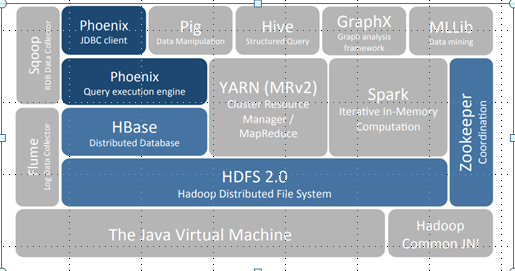
    • Apache Phoenix is fully integrated with other Hadoop products such as Spark, Hive, Pig,Flume, and Map Reduce.

    Who/When:
    • The project was created by the Salesforce.  
    • It was originally open-sourced on GitHub and became a top-level Apache project on 22 May 2014. 


    Challenge :
    • The challenge today is blending the scale and performance of NoSQL with the ease of use of SQL


      Hbase
    • •Hbase NoSQL column family database
    • •Store data as sorted maps as byte Array
    • •Low level APIs
    • •Write Java code or use low level API

    Why Phoenix

    • Relational database engine supporting OLTP for Hadoop use Apache Hbase as its backing store.
    • Transforms SQL queries to Hbase calls hence hiding complexities for noSQL functions.
    • Low Latency  
    • Reduces the amount of code users need to write 
    • Performance optimizations transparent to the user(scans, server-side filter, secondary indexes )

    Phoenix and Hbase together


    Accessing HBase data with Phoenix can be easier than direct HBase API

    SELECT column FROM table WHERE column > 30

    Versus


    scan 'table', {FILTER => "ValueFilter(=,'binary:30')",LIMIT => 10}

    Versus

    HTable t = new HTable(“table”);
    RegionScanner s = t.getScanner(new Scan(…, new ValueFilter(CompareOp.GT, new CustomTypedComparator(30)),…));
     while ((Result r = s.next()) != null)
    {
    // Reading values from Result class object
    byte [] value = result.getValue(Bytes.toBytes(“columnfamily"),Bytes.toBytes(" column "));
    System.out.println(Bytes.toString(value));
    }
    s.close();


    Architecture


    •Phoenix pushes processing to the server - most "by hand” API accesses do not use co-processors  
    •Phoenix supports and uses secondary indexes
    •Phoenix uses "every trick in the book" based on various factors: the HBase version, metadata and query, reverse scans, small scans, skip scans, etc. 


    Few Phoenix SQLs:

    Create table  -

    CREATE TABLE IF NOT EXISTS us_zip (
          zip CHAR(5) NOT NULL,  
          city VARCHAR NOT NULL,
          hhc BIGINT
          CONSTRAINT my_pk PRIMARY KEY (zip,city))
    DATA_BLOCK_ENCODING='NONE',VERSIONS=5,MAX_FILESIZE=2000000 split on (‘a’, ‘p’ ,’r)’
    COMPRESSION=‘LZ4’ TRANSCATIONAL=true;

    Insert few records -

    UPSERT INTO us_zip  VALUES('60500','New York', 81431);
    UPSERT INTO us_zip  VALUES('60501',‘Dallas', 91233);
    UPSERT INTO us_zip  VALUES(‘06095,‘Windsor, 92433);

    Query -
    SELECT zip,city ,hhc
    FROM us_zip
    where hhc = (select max(hhc) from us_zip );

    View on the top of Hbase table - 

    CREATE VIEW “test_log“  ( k VARCHAR primary key, “name”."value" VARCHAR);

    CREATE VIEW my_view ( new_col SMALLINT )
        AS SELECT * FROM my_table WHERE k = 100;


    Phoenix benefits
    •SQL Datatypes built in
    •Schemas, DDL, Hbase Properties
    •Composite Primary Key
    •Map existing Hbase tables
    •Write to Hbase, read from Phoenix
    •Salting
    •Indexes
    •Client side rewriting
    •Master-slave configuration
    •Parallel scanning with final client side merge sort
    •RPC batching
    •Use secondary indexes if available
    •Rewrites for multitenant tables

    •Server side push down
    •Filters
    •Skip scans
    •Parallel Aggregation
    •TopN (coprocessor)

    •Join and Subqueries
    •Inner, left, right, Full Outer join, Cross Join, Semi Join, Anti Join

    •Query server – Similar to REST Server
    •Protobuf 3.0 over http
    •Has JDBC thin client

    •Spark Integration

    •Secondary index
    •At query time, the optimizer will use the index if it contains all columns referenced in the query and produces the most efficient execution plan

    •Global index
    •CREATE INDEX my_idx ON sales.opportunity(last_updated_date DESC)
    •Read optimized(Use case)
    •Different table per index
    •Transactional tables indexes have ACID guarantee
    •Local Index
    •CREATE LOCAL INDEX my_index ON my_table (v1)
    •Write optimized (Use case)
    •Use same table – different CF
    •Functional index
    •Supported

    By default, unless hinted, an index will not be used for a query that references a column that isn’t part of the index. 


      Future Road map
    •Calcite Support
    •No Generic Yarn or Tez layer
    •Offset support
    •Local index re-implementation

    Websphere Dummy certificate expired - DummyServerKeyFile.jks , DummyServerTrustFile.jks

    If you faced issue with ibm provided dummy certificate expired just like us and looking for the solution.  This blog is for you.  You can re...